
Restrict Item Codes for SafeSite Users
Head contractor and subcontractor administrators can control which item codes are available to individual SafeSite users when they create electronic dockets.
Restricting item codes reduces the number of chargeable items a user needs to choose from. This makes it quicker to create a docket and reduces the risk of selecting the wrong item.
Note: When you create a new SafeSite user, all available item codes are assigned to the user by default. (All) appears next to the supplier name in the Item Codes field when all item codes for that supplier are assigned.
In this article
Permissions
To access the Users page (Menu > Users) and manage the item codes that SafeSIte users can select when creating a docket, you must have the following Virtual Superintendent permissions:
- User Admin
- Subcontractor Admin
Assign Item Codes to a SafeSite User
To restrict SafeSite users to specific item codes:
Note: Users with the Admin Manager permission can restrict item code selection for any SafeSite user. Users with the Subcontractor Admin permission can only manage item code selection for users in their own organization.
- Sign in to Virtual Superintendent.
- Click Menu > Users. The Users page opens on the SafeSite App Users tab, displaying a grid of all SafeSite users in your project and their permissions.
- Type the user's name in the filter at the top of the Name column, or their email address at the top of the Email column.
-
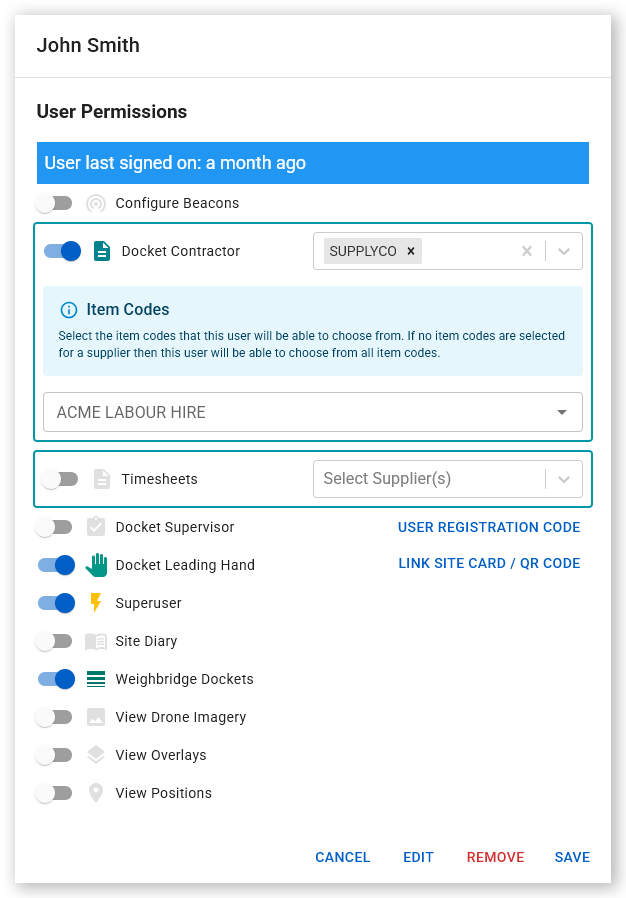
Click the user's name in the grid. The User Permissions dialog opens.
 Click or tap to expand image
 - Open the Item Codes list or type an item code in the search field.
- Select the item code to assign it to the user.
- Repeat the previous steps for any additional item codes. Alternatively, open the selection list and use the checkboxes to select several item codes in one action.
- Click Save. Only the assigned item codes are available to the user when they create an electronic docket in SafeSite.
Note: If you need to assign most of the available item codes to a user, select the All checkbox, then deselect the individual item codes that the user doesn't need.